Project / Homelab

A small server I run, break, and fix.

My homelab is an old laptop running Ubuntu and a set of Docker containers. It hosts my media, photo backups, files, and this website. It is where most of my hands-on Linux, networking, and security learning actually happens.

  • Docker
  • Nginx
  • Tailscale
  • PostgreSQL
  • Linux
specs.txt
cpu
AMD Ryzen 5 3500U
gpu
Integrated Radeon Vega 8
ram
4 GB DDR4
disk
512 GB NVMe SSD
os
Ubuntu 24.04 LTS

Why I built it

It started with an old laptop and some curiosity

It did not start as a plan to run this many services. I had an old laptop sitting unused, and I wanted to get it working again and get some real Linux exposure out of it.

Then I kept asking what else it could do. Each new service pulled in something I had not done before: Docker, remote access from behind CGNAT, a reverse proxy, databases, monitoring.

  • Own my data. Immich and FileBrowser replace Google Photos and Google Drive, so my photos and files stay on hardware I control.
  • Practice for the work I want to do. Cybersecurity, cloud and infrastructure roles need hands-on experience that coursework and certifications alone do not give.
  • Get real use out of old hardware. A 4 GB laptop forces trade-offs that a bigger machine would hide.

What it is

Personal infrastructure, not a data center

It is a single laptop, not a rack, and it is not enterprise infrastructure. What makes it useful is that I actually rely on it, so when something breaks I have to work out why.

Most of the technologies on my resume show up here together rather than on their own:

  • Linux administration on a machine I depend on every day
  • Running several applications side by side with Docker
  • Remote access from behind CGNAT, without port forwarding
  • Publishing one service to the internet and keeping the rest private
  • Databases, storage, and logs that belong to real applications
  • Troubleshooting when something breaks and nobody else will fix it

Architecture

One laptop, two ways in

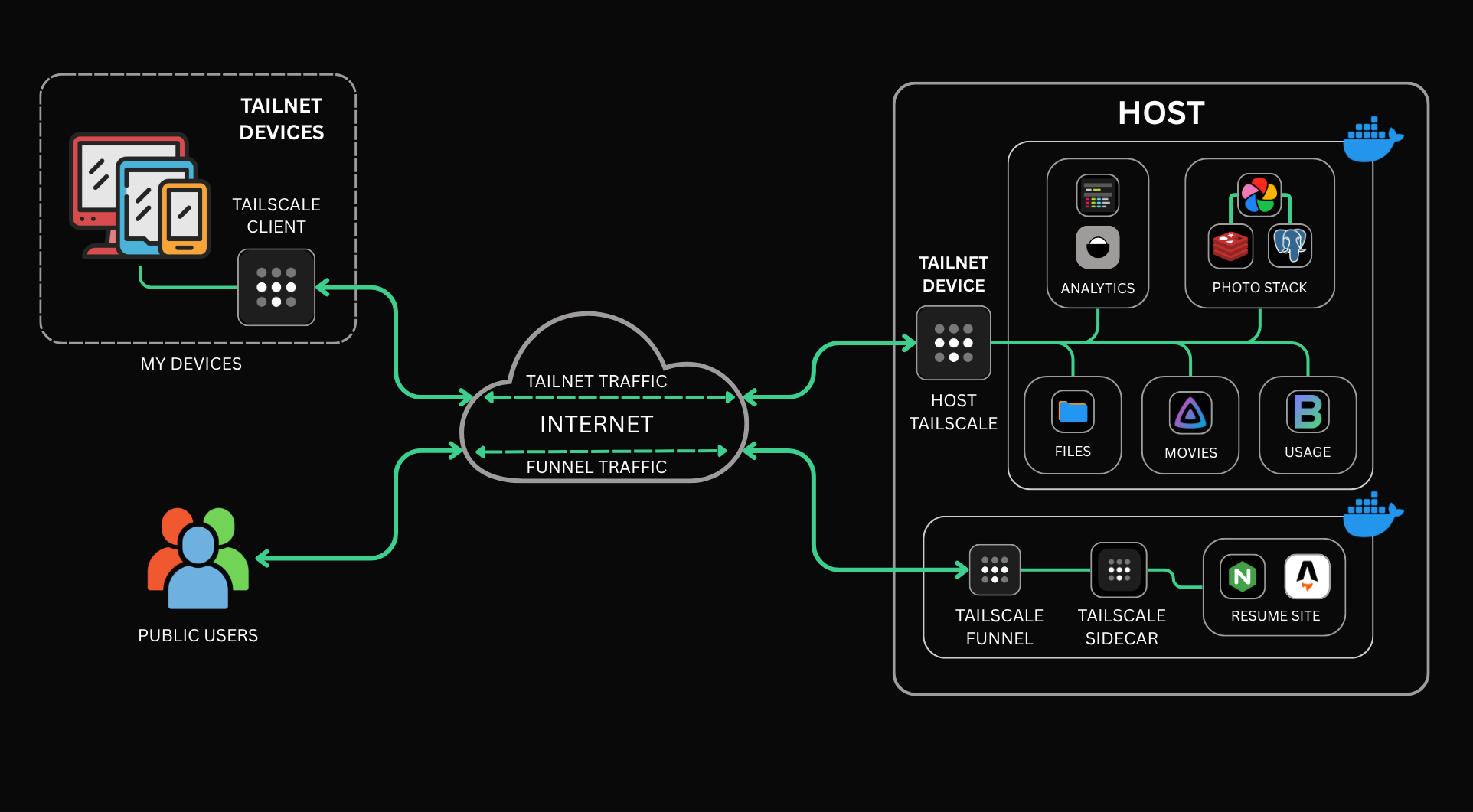
CGNAT ruled out port forwarding, so everything I run is reached over Tailscale. This site is the only service with a sidecar and Funnel turned on. Every other container just publishes its port, which keeps it reachable on the tailnet and on localhost and nowhere else.

Homelab architecture. My devices run the Tailscale client and reach the host over tailnet traffic. Public users reach it over Funnel traffic. On the host, Docker runs analytics, the photo stack, file storage, movies and usage monitoring behind the host's Tailscale, and a separate Tailscale Funnel and sidecar sit in front of the Nginx container serving this Astro site.
Simplified view of the homelab. Funnel traffic through the Tailscale sidecar is the only path open to the public internet. Everything else answers on the tailnet or on localhost, and the tailnet only contains devices I have added.

The public path

A visitor's request reaches Tailscale's servers first, then travels through an encrypted tunnel to the portfolio's Tailscale sidecar. That sidecar sits in front of an unprivileged Nginx container which serves the built Astro site, and Nginx proxies the Umami tracking script so analytics load from the same hostname. No other container has a sidecar or a public hostname.

The private path

The host runs the Tailscale client itself, so the remaining containers only publish their ports instead of getting a sidecar of their own. My phone and laptop are on the same tailnet, which is how I reach Jellyfin, Immich and FileBrowser from anywhere. Those ports also answer on localhost, so anything on the machine can use them. Nobody else reaches any of it: the tailnet only contains devices I have added.

Services

What actually runs on it

These are the applications that make the lab worth maintaining. They are grouped by what they do rather than listed container by container.

  • Access

    • Tailscale
    • Tailscale Funnel

    The host runs the Tailscale client, so my own devices reach the machine over WireGuard instead of a public address, and container ports are published to the tailnet and to localhost. Nothing on the router is forwarded. This site is the one exception: it sits behind a Tailscale sidecar with Funnel enabled, and that is the only thing the public internet can reach.

  • Media

    • Jellyfin

    Jellyfin organises my movie and TV library and streams it to my phone and laptop over the tailnet. It uses VAAPI on the Vega 8 for hardware transcoding, but formats that still need a full transcode lean on the CPU, which makes this the heaviest service on the hardware.

  • Photos

    • Immich

    Immich backs up photos from my phone, as my alternative to Google Photos. It is the most involved application in the lab, with its own PostgreSQL database and Redis runtime alongside the main server.

  • File storage

    • FileBrowser

    A browser-based file manager I use as a small self-hosted Google Drive, reachable from any of my devices over the tailnet.

  • Monitoring

    • Beszel

    Beszel tracks the hardware: CPU, memory, temperature, GPU, storage and network for the host, plus memory, network and storage for each Docker container. With 4 GB of RAM, it is how I see which service is actually using the resources.

  • Web

    • Nginx
    • Umami
    • GoAccess

    Nginx serves this portfolio. Umami, backed by PostgreSQL, is self-hosted analytics for the site. I have also used GoAccess to read the Nginx access logs directly.

Security and exposure

Keep the attack surface small

The homelab is not hardened in any formal sense. Most of the security work is about deciding what is reachable, by whom, and from where, and being honest about what is left.

  • Nothing is port-forwarded

    CGNAT ruled out port forwarding from the start, and I have not needed it since. No service has an open port on my router. Remote access goes through Tailscale.

  • One public service

    Funnel is enabled only for the portfolio, and it is the only container with a Tailscale sidecar. Jellyfin, Immich, FileBrowser and the media tools answer on the tailnet or on localhost instead.

  • Access rules on the tailnet

    Tailscale ACLs with tags decide which devices can reach which services, instead of every signed-in device being able to reach everything.

  • A tailnet, not an open door

    The tailnet only contains devices I have added, so remote access is limited to people I know. Everyone else gets the funnelled website and nothing more.

  • Unprivileged web server

    The Nginx container runs unprivileged and serves only the built static site. There is no server-side application behind it and no login.

  • Checking the web root

    The Git repository and the production server are kept separate. Deploying means making sure paths like /.git and /.env do not exist on the site, that server config is not in the web root, and that requests cannot climb out of it.

What I am still thinking about

  • Every service shares one host and one disk. Containers isolate applications from each other, but they are not a hard security boundary.
  • Nginx proxies Umami, so part of Umami is reachable through the public hostname. That is attack surface I chose to accept, not something that disappears.
  • Backups of service configuration are still planned rather than done.

Monitoring and troubleshooting

Things break. Logs usually know why.

This is not a full monitoring stack. It is enough to see what the machine is doing and work out which service is responsible when something goes wrong.

  • docker logsFirst stop for a misbehaving container
  • Application logsJellyfin, Immich and Umami each log their own errors
  • BeszelHost and container resource usage, which matters with 4 GB of RAM
  • GoAccessReports built from the Nginx access logs
  • UmamiVisits to this site, self-hosted

Real problems I had to solve

  • Jellyfin

    Playback, libraries, and transcoding

    what happened
    • MKV files that did not play cleanly, or played with the wrong audio track
    • Library scans that kept entries for media I had already deleted
    • Restoring the Jellyfin database
    • CPU pressure whenever a file needed a full transcode
    what it involved
    Setting up VAAPI so the Vega 8 could share the load, and learning the difference between direct play, remuxing, and transcoding. HDR, Dolby Vision and some audio formats are where those differences start to matter.
    what I took from it
    A playback problem can live in the file, the client, the transcoder or the hardware. The fix depends on working out which one first.
  • Docker

    Where did the disk go?

    what happened
    • Docker taking up a large share of a single 512 GB drive
    • Docker images at around 82 GB and overlay2 at around 86 GB at one point
    what it involved
    Tracking down how much space belonged to images, layers and volumes, and why a Snap-based Docker install made that harder to manage.
    what I took from it
    Old images and layers do not clean themselves up. Storage has to be watched like memory or CPU.
  • Umami

    Analytics that did not just work

    what happened
    • Getting the tracking script proxied correctly through Nginx
    • Prisma errors in the Umami logs
    • Visitor region information, which depends on the real client IP surviving Funnel and Nginx
    what it involved
    Reading Umami's own logs alongside the Nginx configuration, and following a request through each hop between the visitor and the database.
    what I took from it
    Even a small analytics setup is a proxy, an application and a database. Any of them can be the problem.
  • Logs

    Which container said that?

    what happened
    • Error messages turning up without an obvious source, with many containers logging at once
    what it involved
    Tracing log lines back to the container and service that produced them before trying to fix anything.
    what I took from it
    Knowing where a log came from is half the diagnosis.

What I learned

Build it, break it, figure out why

That loop is how I learn most things, and the homelab is where it happens most often.

  1. [01]

    Starting a container is the easy part

    docker run takes seconds. Keeping the service working through updates, storage growth, database problems and odd media files is where the actual learning happened.

  2. [02]

    Constraints force better decisions

    With 4 GB of RAM and one disk, I cannot add services without thinking about what they cost. That is a useful habit well beyond a homelab.

  3. [03]

    Read the logs first

    Most of my fixes started with the logs, not with guessing. Finding which container produced an error is often most of the work.

  4. [04]

    Troubleshooting crosses layers

    A broken stream or a missing analytics event can come from the application, the container, the proxy, the tunnel or the hardware. You have to be willing to follow it through all of them.

  5. [05]

    Exposure is a design decision

    Publishing even a static site made me think about what else might be reachable. A lot of security here comes from what I chose not to expose, not from adding more tools.

  6. [06]

    Networking makes more sense when you run it

    CGNAT, tunnels, sidecars, reverse proxies and client IPs were abstract until I needed them to work for my own services.

Resource constraints

Small hardware, real limits

The hardware is modest, which turned out to be a good teacher. A bigger machine would have hidden most of these problems.

  • Memory

    4 GB of RAM has to cover Ubuntu and every container. Immich and Jellyfin both want headroom, so running the whole stack at once is tight.

  • CPU and transcoding

    The mobile Ryzen 5 serves files without complaint but sweats through video work. VAAPI puts the Vega 8 to use, and formats that still need a full transcode decide which files I keep in the library.

  • Deciding what fits

    Every new service starts with the same question: can this machine carry it without taking memory or disk away from something I use every day?

Storage is an operational resource

The OS, Docker images and volumes, the media library and the photo library all share one 512 GB NVMe. Docker's images and its overlay2 directory had quietly grown past 80 GB each at one point. Docker originally came from Snap on this machine, which made its data directory harder to manage than a standard install, so I have since moved to Docker's own packages.

disk-usage (at one point)
docker images
~82 GB
overlay2
~86 GB
total disk
512 GB

Past measurements, not current figures.

Upgrade path

  • More RAM once prices come down: 4 GB shared with every container is the tightest limit in the stack.
  • A second drive for bulk storage, so the media and photo libraries stop sharing the 512 GB system disk.
  • A better machine eventually. If better hardware turns up at a sensible price, I would rather migrate everything across than keep patching this one.

Want to talk about the setup, or something you run yourself?